sRAG - Exploring Secure RAG
Today we are exploring secure Retrieval Augmented Generation systems to create a context aware chatbot.
With all the hype around GenAI, I thought it would be fun to explore a little bit of what RAG has to offer. At a high level, RAG systems allow users to leverage the full power of large language models while giving the model awareness of personal context. LLMs don’t know everything out of the box, they only know about information they were trained on. If you wanted your chatbot to know about internal data such as wikis, docs, procedures, etc. implementing a RAG system provides this context by appending chunks of relevant information from a database into the query for the LLM. As you can imagine, RAG opens up a new world of personal and enterprise solutions enabling custom information retrieval and analysis while leveraging the increasing power of open source LLMs.
Many of the RAG implementations you will see out there leverage OpenAI’s API for LLM computation, but that doesn’t lend itself well towards handling sensitive data in an enterprise environment. In order to leverage this technology whilst protecting the confidentiality of your data, special considerations must be made.
RAG Overview
Let’s dive a little deeper into how a simple version of RAG actually works. Assume you have a bunch of data that you want the LLM to know about so that it can generate informed responses about given a question. Internal wikis, log data, expense reports, tool documentation - any digitized data can be used as context for the LLM. That data is chunked up into smaller segments and stored in a vector database. Vector databases are special types of databases that not only hold strings of data but also a corresponding vector that represents the data entry. These databases are also optimized for vector based search and retrieval.
To quickly explain vectors think back to plotting points in grade school, you have an x and y coordinate representing the position of a datapoint on a two dimensional graph. You can refer to this point as a two-dimensional vector [x, y]. Finding the distance between two points on the graph is simple: sqrt((x2 - x1)^2 + (y2-y1)^2). In a RAG system a process called vector embedding is used to create vector representations of data, typically generated by techniques like Word2Vec, BERT, or Sentence Transformers. These vectors are much larger than just two dimensions, for reference: OpenAI’s embedding model generates 1,536 dimensions. Vectors capture the semantic meaning of data allowing for comparison and similarity measurement between chunks of text. Finding the distance between these multi-dimensional vectors is key to determining how close or similar two pieces of text are in the embedding space.
Once the chunks and their corresponding vectors have been loaded into the vector database they can be used to retrieve context for a given query. When the user asks a question, the question is vectorized using the same embedding model that was used to vectorize the database. The database then returns the top k chunks of text that are closest in distance to the query vector in the embedding space. These chunks represent the most contextually relevant data in the database to the user’s query.
The relevant chunks are then appended to the user’s query and sent to the LLM to generate a response, resulting in a contextually relevant answer.
The Objective
To create a chatbot using a simple RAG system that is context aware of internal data without compromising confidentiality.
The code can be found here: https://github.com/Aidan-John/sRAG
Architecture
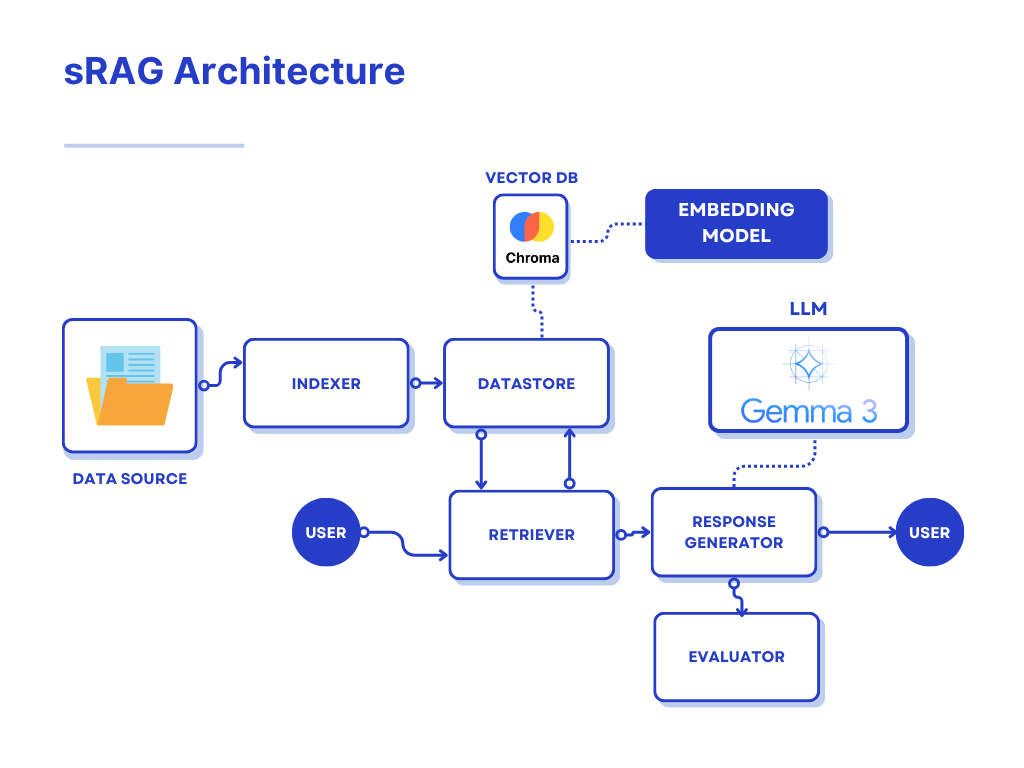
Above is an overview of what our simple sRAG implementation looks like. There are a few core components that merge together to create our system:
- Indexer
- Datastore
- Retriever
- Response Generator
- Evaluator
The codebase is designed to be modular, leveraging interfaces with abstract classes such that the implementations can be swapped out regularly. New tools and methodologies are constantly being developed by the community so it’s important that maintainers of the system are able to upgrade core components and test their effectiveness regularly without refactoring large amounts of code.
Indexer
The indexer parses and chunks the data we want to give our LLM for context. These algorithms take the raw data and transform it into something that the LLM will be able to understand, then chunk that data into smaller pieces.
Real world data is super messy. There can be images, diagrams, charts, spreadsheets. Using a standard parsing algorithm for everything can leave you with incomplete or messy data that the LLM can’t easily process. Optimizing your parsing to extract relevant data is essential to improving accuracy in the LLM’s response (more on this later in the upgrading sRAG section).
LLMs have a limited input context window, meaning there is a maximum character count for the input we can send to the LLM. The model we are using is a version of Gemma3, the size of its context window is about 128k tokens (one token is about 4 characters in English, 100 tokens is about 80-100 English words). When choosing a chunk size it’s important to consider that we are sending the top k relevant chunks with our query, so (chunk_size * k) + len(query) + len(system_prompt) <= 128000 * 4 (more on system prompts later in the response generator section). The window size is fairly large so you shouldn’t have to worry about hitting the limit unless you’re appending significant amounts of data. For reference, a novel is ~90k words (~900 tokens) and War and Peace has ~587k words (~5-6k tokens).
Optimally, the chunking process should not exclude relevant information from each chunk. This can happen for various reasons such as cutting off mid paragraph or not including sufficient data from a table. Chunk size should be set on a per document basis by running tests on various chunk sizes and evaluating the relevancy of the outputs.
In this project we are using some standard parsing and chunking libraries from docling, which won’t give us an optimal solution but serves as a good starting point. Optimizing the parsing and chunking process for your specific data is a challenge, but the reward is a significant boost in accuracy for the LLM’s response.
There are some really nice parsing and chunking algorithms out there such as Llama Parse from Llama Index that handle a variety of different data formats. The problem with this is that you have to send off your data to their service to do the parsing and chunking, which is a no go for a secure system. Using open source tooling such as docling or unstructured is ideal for us because all of the computation is being handled locally. However, building an in-house solution for the types of data you will be using in the system is the best way to ensure that no sensitive information leaves your network.
Datastore
The datastore component handles our interactions with our chosen vector database. In this project we are using Chroma DB, an open-source vector database running locally in docker.
Chroma stores data in collections - which is like a table in normal database. Given our chunks of data from the indexer, this component will store the chunks in our chosen collection. Normally we would run the data through an embedding model to generate the vectors for a given chunk and then store both the data and its vector in the collection. Fortunately for us chroma bakes in the vector computation to the collection.add() function. Chroma allows you to specify a vector embedding function from a multitude of supported functions or you can add your own custom function if you wish. We are going to use a popular sentence transformer called all-MiniLM-L6-v2 which generates vectors in 384 dimensions.
Datastore also handles requests from the retriever to search for relevant context. The question is vectorized with all-MiniLM-L6-v2 and returns the k most relevant chunks.
Retriever
The retriever component gets passed the query from the user and contacts the datastore to provide relevant context. In our implementation we directly contact the datastore for context and pass it to the response generator. However, implementing a retriever component allows us to use more advanced tactics like reranking in the future - more on that later in the upgrading sRAG section
Response Generator
The response generator is what actually interacts with our chosen LLM and handles response generation for both user queries and the evaluation step. Here is where we combine our context and query into one string before we send it to the LLM. Additionally we combine a system prompt to give the LLM instructions on how it should respond. Our system prompt is as follows:
Use the provided context to provide a concise answer to the user's question.
If you cannot find the answer in the context, say so. Do not make up information.
Then we construct our prompt in the following format:
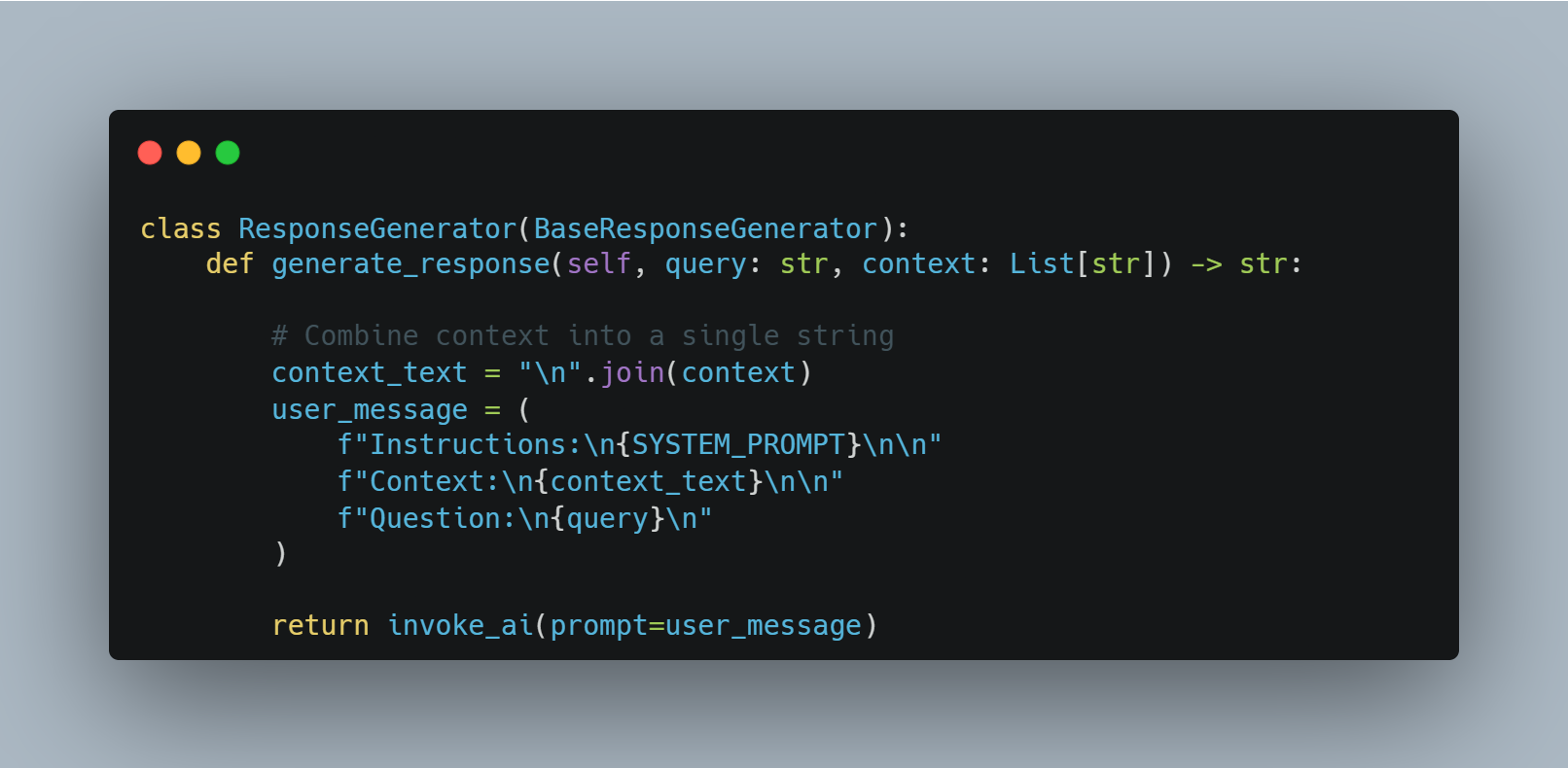
The reason we separate the instructions, context, and query in this way is specific to Gemma3. Other models support a version of prompting in which you can codify the differentiation between system prompts, context, and user queries. Gemma3 does not, so this is a way to give that differentiation to the model in plain English.
The LLM response is then returned to the user.
Evaluator
The evaluator is the component we use to test our system. Testing a system like this requires data that the model wouldn’t have been trained on. It would also be helpful if the evaluation data were similar in structure to the kinds of data we want the system to ingest.
In our project there are a series of evaluation PDFs about a town called Swan Lagoon. Swan Lagoon does not exist, none of the information about the town is real, but the fake details about the town are very specific. This allows us to test our system to see if the responses being generated are a result of the model’s initial training or if the responses are actually based on the context from our database. We create a series of questions and answers about our fake data and measure the accuracy of the model’s responses.
The system prompt is as follows:
SYSTEM_PROMPT = """

You are a system that evaluates the correctness of a response to a question.
The question will be provided in <question>...</question> tags.
The response will be provided in <response>...</response> tags.
The expected answer will be provided in <expected_answer>...</expected_answer> tags.

The response doesn't have to exactly match all the words/context the expected answer. It just needs to be right about the answer to the actual question itself.

Evaluate whether the response is correct or not, and return your reasoning in <reasoning>...</reasoning> tags.

Then return the result in <result>...</result> tags — either as 'true' or 'false'.

"""
We then generate a prompt that includes the system prompt, one of our test questions, the expected answer to this test question, and the response we get from the LLM to our test question.
We are leveraging the power of the LLM to check itself for errors, pretty neat eh. From the response we extract its evaluation and tally the results. This gives us a metric for how accurate our system is. When we upgrade or change a part of this system, we can compare this metric to the metric from the previous version to see if the update was beneficial.
Project Demo
In this project we are using a RAG system to create a chatbot about a fictional town named Swan Lagoon. We have four different PDF files that contain specific data about our fake town: a booklet containing a brief history about the town, a business directory listing information about local businesses in table format, a service guide with information about town resources in differing table formats, and a tourist guide listing some popular destinations for visitors. We also have a JSON file with 25 questions and answers about the town based on information found in the PDFs that will be used for testing the accuracy of our system.
Let’s get started by executing docker compose up --build -d in the root of the project. This will stand up our Chroma vector database, ollama for locally running Gemma3, our backend API with our RAG pipeline, and our frontend UI. This step requires us to download the Gemma3 model so it will take a few minutes depending on your internet connection.
After everything is stood up we can access our frontend at localhost:3000
Populating ChromaDB
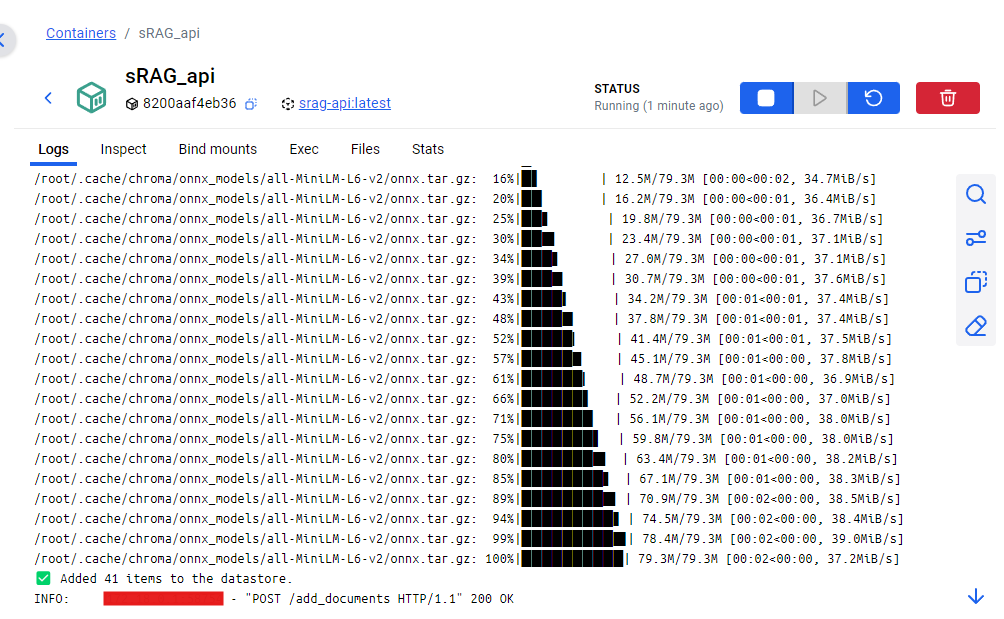
First we need to populate our vector database. For ease of use I’ve added a button in the UI to load the documents.
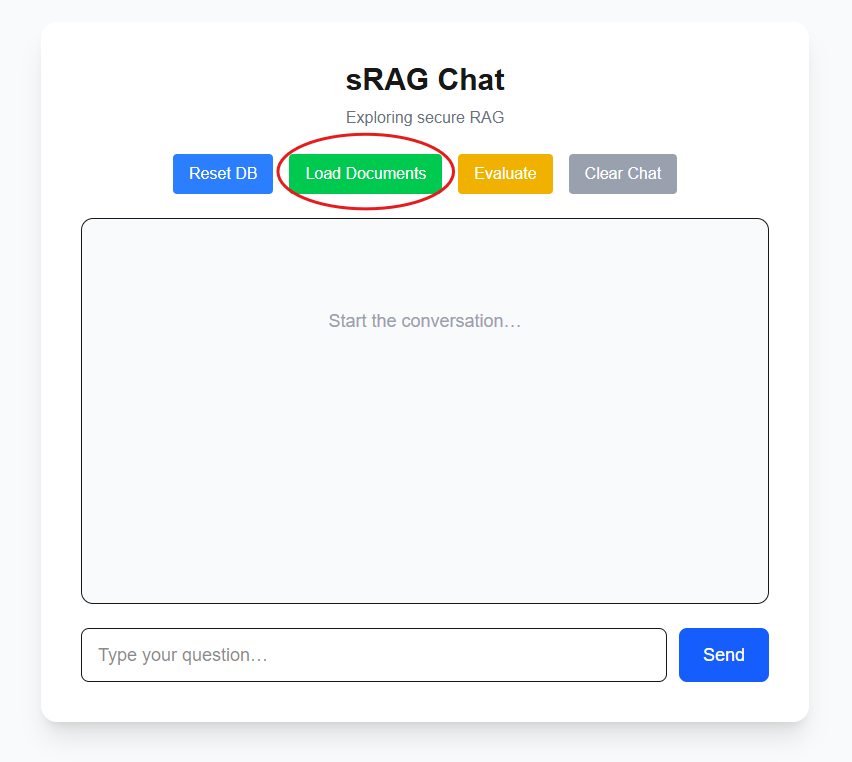
In the logs for our API we can see they have been parsed, chunked, and loaded into the vector database.
Asking a question
Now our system is ready for some questions about our data! Let’s ask something like “What is the contact number for Swan Lagoon Police Station?”
This is located in our service guide under local emergency contacts.
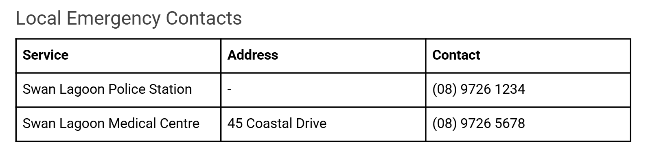
Let’s see if our system was able to parse out this information correctly from the table and return an accurate response:
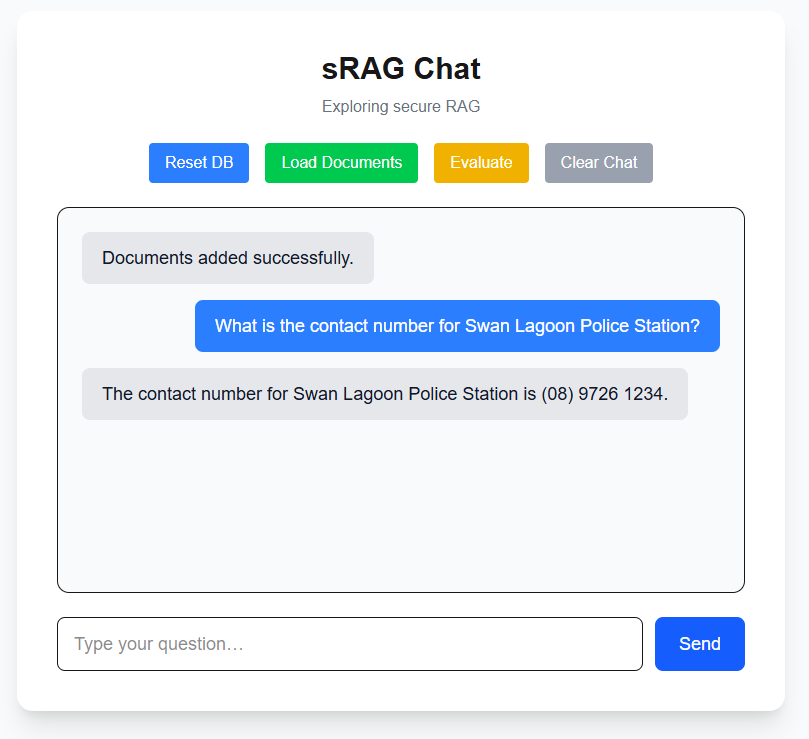
Works like a charm!
Resetting DB and asking a question
Let’s try emptying out our vector database and asking the same question. Will the system hallucinate an answer?
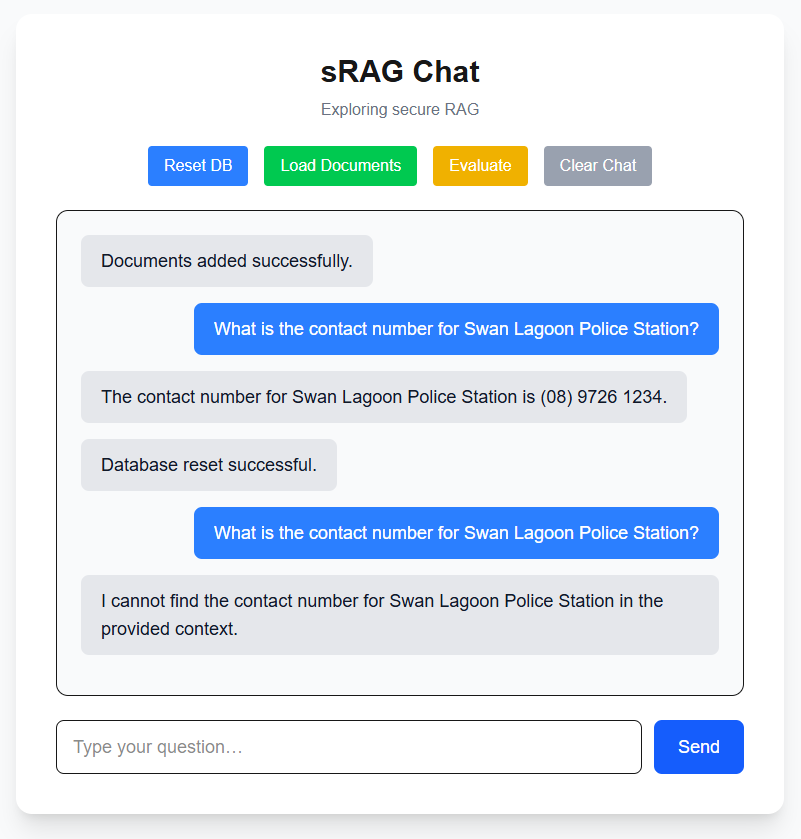
No hallucinations here!
Running Eval
Finally let’s run our evaluation procedure to get a baseline on how well our system is performing in its current state by hitting the evaluate button. This will take a while depending on your processing power.
We can see it working within the logs of the API.
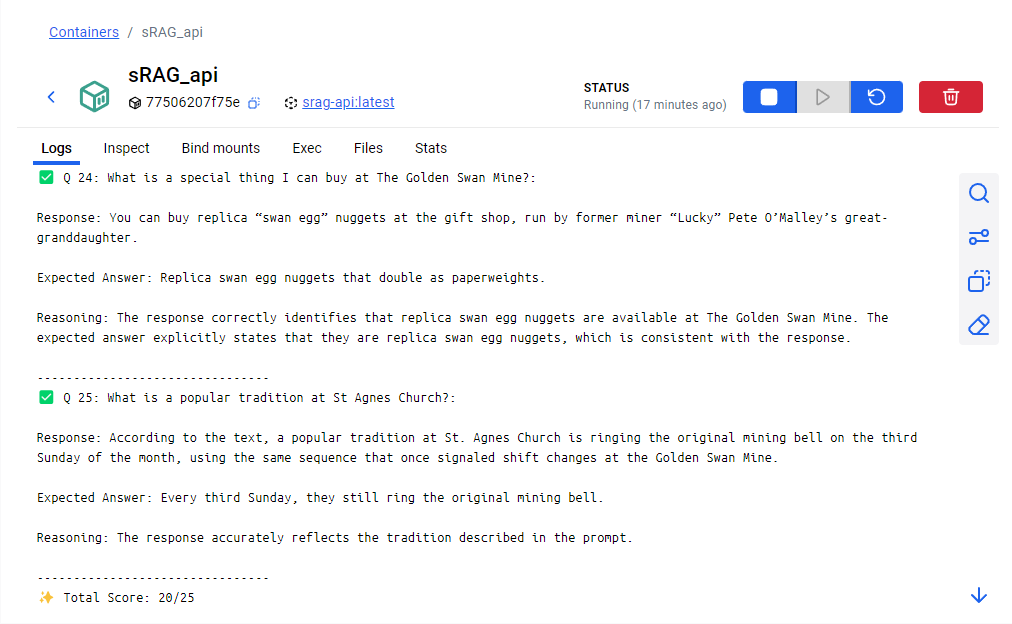
We submitted a total of 25 questions and their expected responses to the evaluator and are given a score of 20/25. Not bad! If we scroll up we can see each question that was asked, the response from the LLM, the expected answer, and the reasoning for the model’s evaluation.
Cleanup
Thanks to docker compose shutting down the demo is easy with docker compose down -v.
Upgrading sRAG
The RAG system we have built here is a great starting point. In this last section I want to cover some advanced techniques we can apply in the future to get better and more accurate results from the system.

Parsing/Chunking Strategies
Earlier we touched on the idea of using better parsing to improve the effectiveness of our system. In order to get the most out of our parsing and chunking we can add a classification system for the data that’s being ingested. Based on your use case you can build out specific parsing and chunking strategies for the different formats of data. The classification system would look at the current document that is about to be indexed and choose the parser and chunk size that would be optimal for that specific kind of document.
Reranking
When the user asks a question like “What were the sales numbers in 2024?”, the vector search will return the top k most relevant chunks to be used in the query. These chunks are usually not returned in order from most relevant to least relevant. There is a phenomenon in LLMs known as the lost-in-the-middle problem which describes a common behavior of LLMs tending to focus more heavily on the beginning and end of a given prompt. If the chunks being returned are not in order from most to least relevant, it is possible that your most relevant data can get lost in the middle. We can solve this through a process called reranking, which uses another model to determine the relevancy between chunks and reorder them from most relevant to least.
Hybrid Search
Strictly using vector search is not the best search method for all use cases. For example, if you had an online store where users are asking about a specific product, you want to ensure that the product name is an exact match to the product in your database. For this you would use a combination of vector search and keyword search. After conducting both searches on their respective databases, you can feed these chunks into a reranker, find the top k most relevant chunks, and use them as context for your input to the LLM.
Upgrading the LLM
In this project we are using a version of Gemma3 trained on 4B parameters and has been quantized to reduce memory footprint. Running the LLM locally is a great way to ensure that none of your data is leaving your control. There are other ways of implementing secure LLMs such as using Azure OpenAI which is approved as a service within the FedRAMP High Authorization in Azure Government, more info here: https://learn.microsoft.com/en-us/azure/ai-foundry/openai/azure-government
I am constrained by the computational limits of my PC which is why I am using an older and smaller model. If you have access to more processing power then using more advanced models will significantly improve your responses and allow for more options when it comes to development. In addition to their wider knowledge base, newer models have more features like specified inputs for system prompts and context. They are also better at solving common LLM problems like the lost-in-the-middle problem and needle in a haystack problem (more on that in the next section). Additionally with each open source model that is released the input context window seems to be growing at an insane rate. Our version of Gemma3 has an input context window of 128k tokens but newer versions of models like Llama4 boast a 10M token input context window.
Cache Augmented Generation - CAG
The needle in a haystack problem is exactly what it sounds like, how good is an LLM at finding relevant information within a sea of input context. The newer models have gotten very good at solving this problem. This combined with increasing input context windows on the order of millions of tokens allows for another kind of system to become a realistic alternative for implementation. Cache Augmented Generation is exactly like RAG but instead of appending relevant chunks to your query you can append the entire documents into the input window. Say for example a user asks the question “Summarize the financial reports from 2020 and 2021”. A CAG system would search for the 2020 and 2021 financial reports in the database and feed the entirety of both documents into the input for the LLM. The advantage here is that your LLM gets full context of your data, you don’t have to worry about whether the chunks you’re providing contain all the information the LLM needs to answer the user’s question.
Agentic Behavior
We can utilize the power of LLMs to do reasoning and optimization in order to improve the performance of our system.
Step-back Prompting
Instead of doing the vector search with the query coming directly from the user, we can ask the LLM to modify the query so it is more retrieval friendly. This is a technique called step-back prompting and it was created by Google DeepMind.
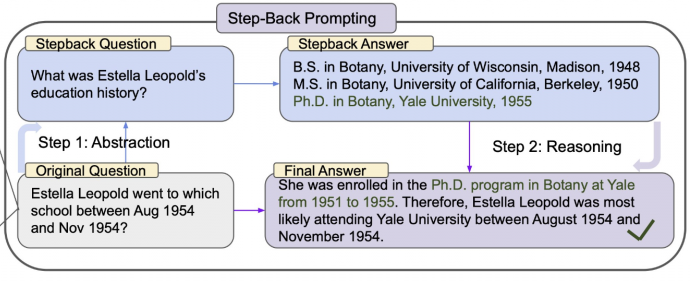
Performing the vector search against the step-back question yields a more generalized and useful result which we can use in the input for our final answer.
This kind of technique can also be used for query planning. Imagine our user asks “How are sales trending from 2020 to 2022”. A step-back process like this can break down the question into three sub-questions, searching for sales data from 2020, 2021, and 2022 in our database. Then it will combine all this data and feed it into the LLM to provide an answer.
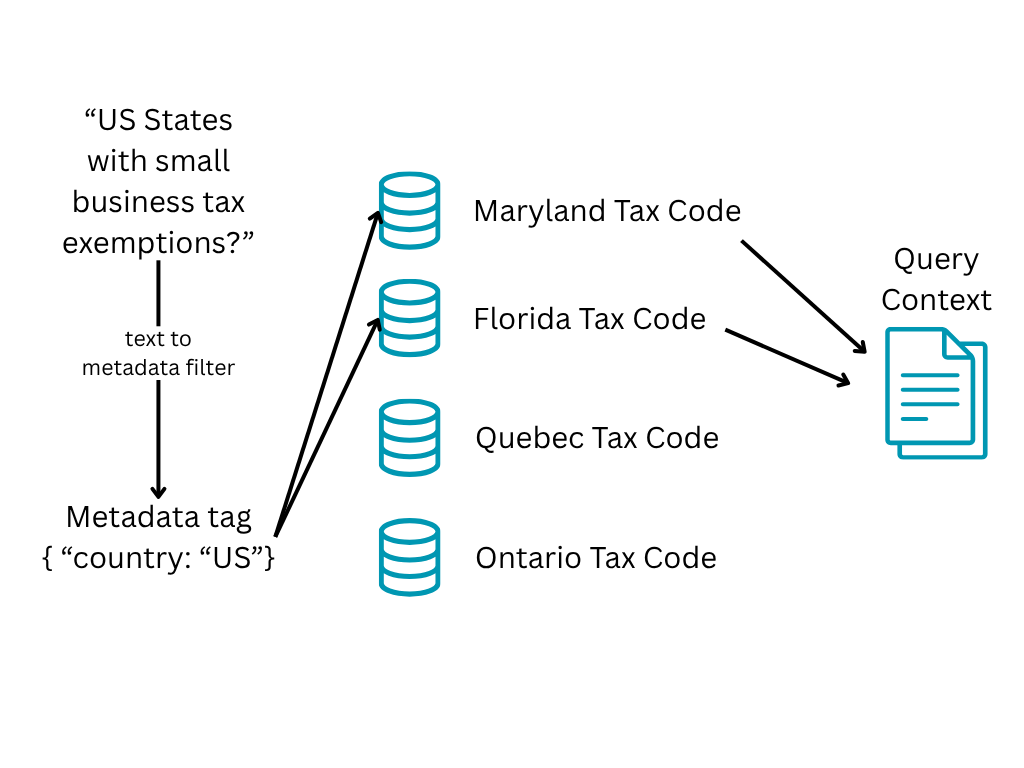
Metadata filters
During the indexing process we can add metadata tags to the documents and the databases/tables they are being held in that relate to the data inside. This can be done programmatically or by asking the LLM to generate these tags from a list of potential tags. From there we can add metadata to the user’s query and use that to filter our search area.
Corrective RAG (CRAG)
Corrective RAG is a method of refinement for the responses given by a RAG system.
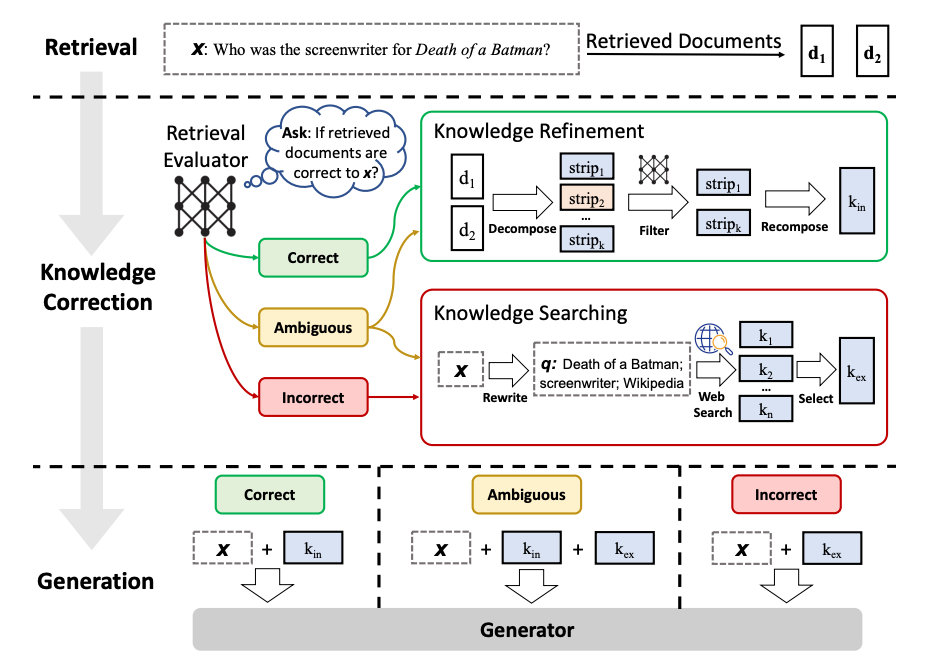
For a given query, we perform the context retrieval like normal. Then we get our LLM to do some evaluation on the documents to decide if the retrieved documents are correct and relevant to the question we are asking. If it is, we go through a process to do knowledge refinement and clean up the knowledge. If it’s ambiguous or incorrect, then the agent will use the internet to find sources. It will repeat this until it feels like it has enough context to provide a correct answer and generates the results from there. You can read more about this technique here: https://arxiv.org/pdf/2401.15884
Conclusion
Thanks for coming to my TED talk, hope you enjoyed.
Disclaimer: I am no expert, this is my first proper dive into GenAI systems. Had a lot of fun learning and definitely want to explore more in the future. Any and all feedback is welcome :)